Projects
They just werk on my machine
Shellscripts
sap - AUR helperytlol - YouTube player/client
tpbs - PirateBay scraper
lyry - Genius lyrics fetcher
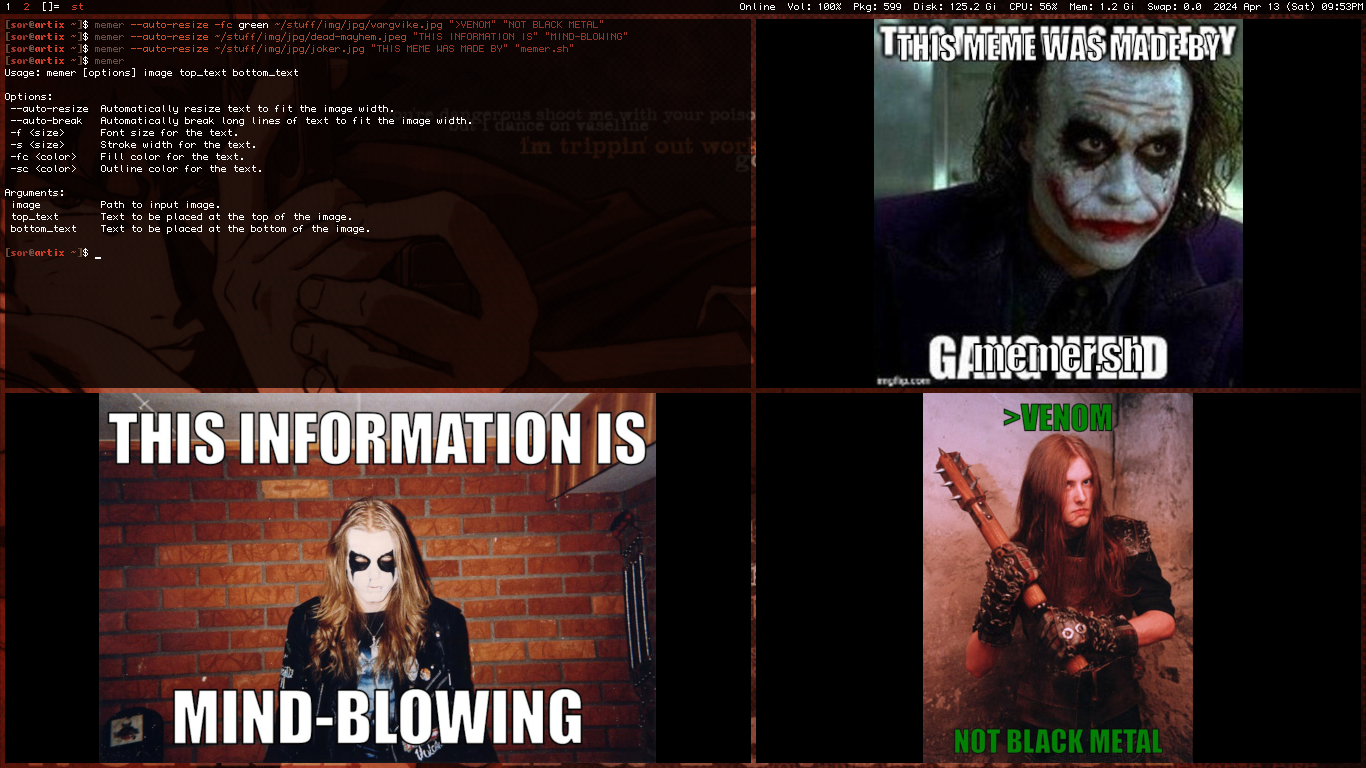
memer - meme maker using imagemagick
pacmano - pacman package organizer/logger
sap
Shellscript AUR helper
Requires git
Aureate - Similar project written in C
Manual
Usage: sap [arguments] <package>

Arguments:
None		Sync package
 -s		Search for packages, prints top 250 results for query
 -c		Sync package after editing its PKBUILD
Examples
Install a package
Install the 'brave-bin' package.
sap brave-bin
Look for packages
List AUR results for the query 'quake'.
sap -s quake
Install a package and modify its PKGBUILD
Install the 'gzdoom-bin' package after opening its PKGBUILD on the user's default editor ($EDITOR variable or xdg-open if variable is not set), allowing the user to modify the PKGBUILD if necessary, for instance, to remove a broken dependency.
sap -c gzdoom-bin
TODO
- Option to update packages
- Keep build dependencies option
- Handle AUR dependencies
- Get rid of "dependencies not found" message
Patch notes
30/8/26 v1.4
- Improved PGP signature and makedepends handling
- Improved search
- "Package not found" message
12/1/26 v1.3
- Added PGP signature handling
- Changed search to "-s" and customsync to "-c"
- Sync option is now the default behavior
21/7/25 v1.2
- Fixed problems with the search option
v1.1
- Added search option
- Added customsync option for editing PKGBUILD before compiling packages
- Removed remove option (just use pacman -Rns)
- Removed bashisms
Install:
curl https://sor.neocities.org/projects/sap.txt -o /usr/local/bin/sap
chmod +x /usr/local/bin/sap

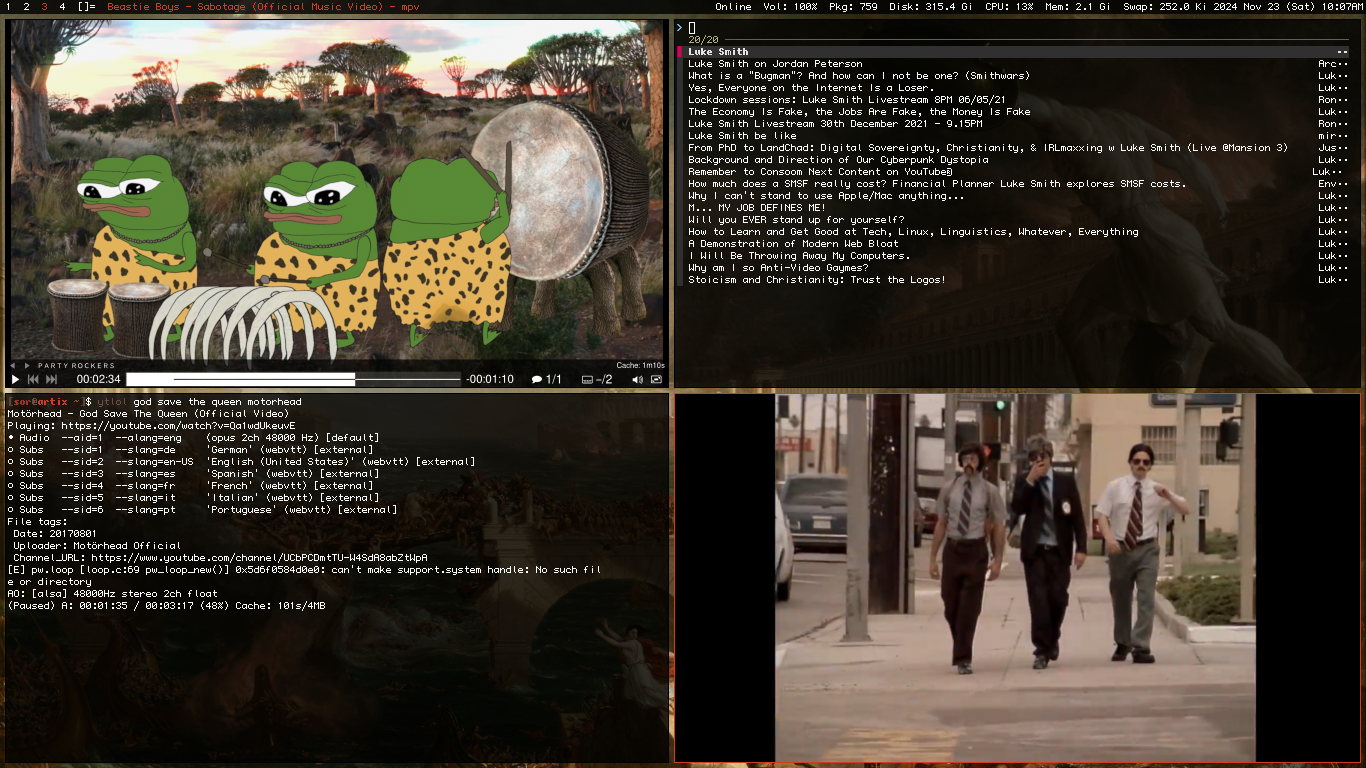
ytlol
Shellscript YouTube player/client
Requires mpv, yt-dlp, & fzf (for -f)
ytfzf - Similar project written in Shellscript
yt - Similar project written in Bash
Manual
Usage: ytlol [options] <query>

Options:
None    Play top result as audio (default)
 -v     Play as video and save position on quit
 -f     Search & pick result
 -n     Number of pages to query, complement to -f
 -s     Skip title/link message (not faster)
 -u     Update Invidious instance used for searches
 -e     Enable search query encoding
 -p     Custom player command. If the word 'URL' is included, it will be replaced with the video URL (e.g., -p 'mpv --pause $(yt-dlp --get-thumbnail URL)').
        If 'URL' is not included, the video URL will be appended at the end of the command (e.g., -p 'mpv --fs' or -p xdg-open).
Examples
Listen to the top result
ytlol aphex twin
Watch the top result as video
ytlol -v big buck bunny
Listen to selected result
ytlol -f rick astley
Open top result on LibreWolf
ytlol -p librewolf pewdiepie
Stare at top result's thumbnail
ytlol -p 'mpv --pause $(yt-dlp --get-thumbnail URL)' landscape
Download a song with metadata
ytlol -p 'yt-dlp -x --embed-metadata --embed-thumbnail' rammstein tier
TODO
- Option to play first playlist result
- Support other sites
- Display [LIVE] for ongoing live streams in results
- Ueberzug thumbnail and video description previews
Patch notes
21/9/26 v1.7
- Small fixes
14/7/26 v1.6
- Immediate results
- Added playlist results
- Added subscriber count display to channel results
- Added view counts and upload dates to video results
- Faster title/link message
- Search query encoding no longer default
v1.5.1
- To avoid problems with curl or other similar problems, -p now expects capitalized URL instead of lowercase 'url'.
v1.5
- Added -p for custom video players, which also skips the title/link message like -s. If the command doesn't include "url", the result's URL is appended at the end of the command.
- Added -n to choose amount of pages to query for -f. For example,
ytlol -f -p 2 search querywill query two pages - Added -e to disable search query encoding
- Added search query encoding as default, this allows searching stuff with special characteres
v1.4
- Added -s to skip title/link message
- Complete code and usage revamp. -80 lines and around -2400 chars (Seriously)
- -f is now an option to enable fzf menu selection instead of fzf menu selection + Video. It can be combined with -v (-fv, -vf, ...) to play selected result as video
- Removed -a. Use -f without -v instead to play selected result as audio
- Removed bashisms
v1.3
- Channel results
- fzf now uses --exact
- yt-dlp errors are now sent to limbo aka /dev/null
- Fixed video title and link getting messed up in the mpv output
- Only queries 1 page now, but you change that in the code. May add an option for it soon.
v1.2
- "-u" Option to update default instance variable, use it if the default one is dead
- New usage guide message
- Minor fixes
v1.1
- Changed -fa to -a
- Changed invidious instance
- Fixed ignoring $1 when there's no defined option
- Removed bashisms
- Removed fzf blank stuff
Install:
curl https://sor.neocities.org/projects/ytlol.txt -o /usr/local/bin/ytlol
chmod +x /usr/local/bin/ytlol
tpbs
Shellscript PirateBay scraper
Requires fzf (except for -f)
Manual
Usage: tpbs [options] <query>

Options:
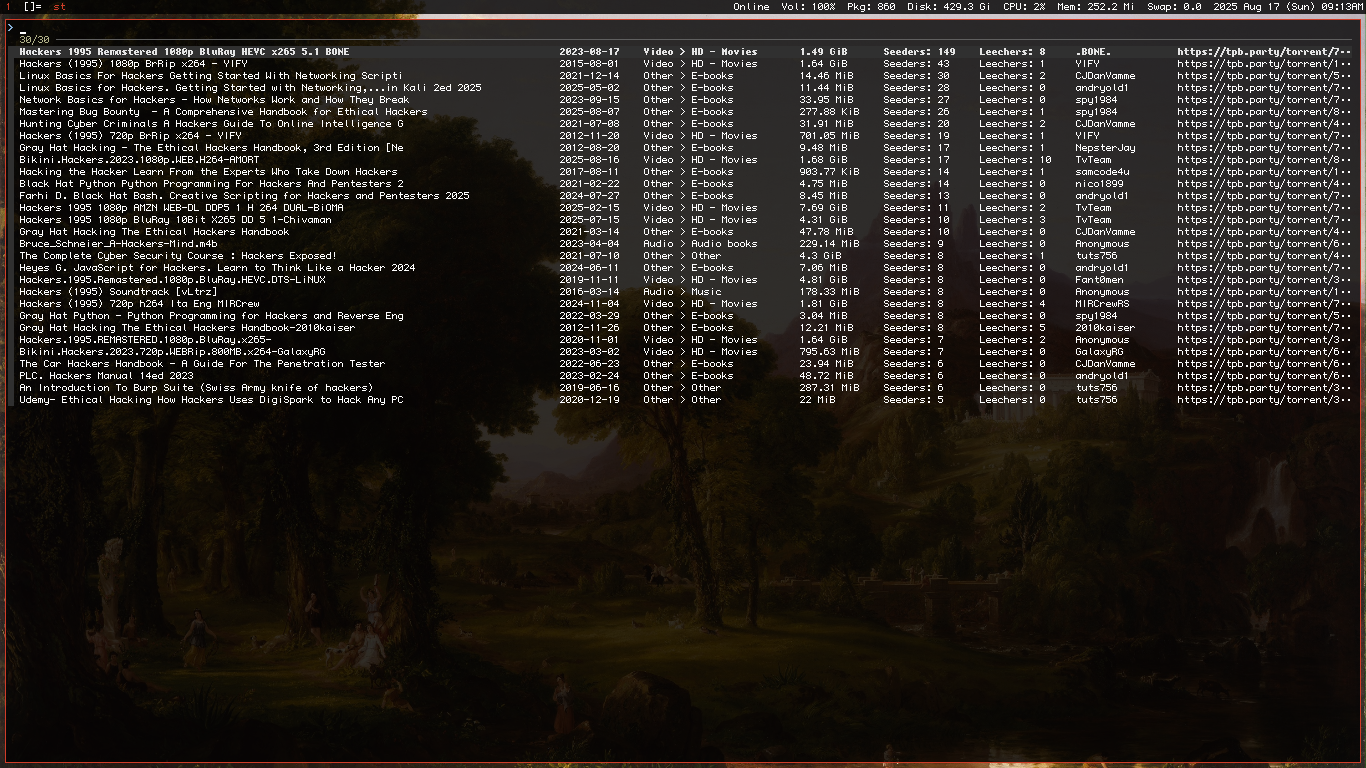
None            Select from top 30 results on fzf
 -f             Feeling lucky, retrieves top first result
 -u             Update TPB mirror by looking for a healthy mirror
 -n <number>    Number of pages to query, 30 results/page (e.g., -n 3 = 90 results, 3 pages)

Categories:    Only show results from selected categories
None            All categories
 -a             Audio
 -v             Video>
 -p             Applications/Programs
 -g             Games
 -o             Other
Examples
Select from top results
Select from results for the query "linux mint". (Downloading from the official site is recommended.)
tpbs linux mint
Retrive first result
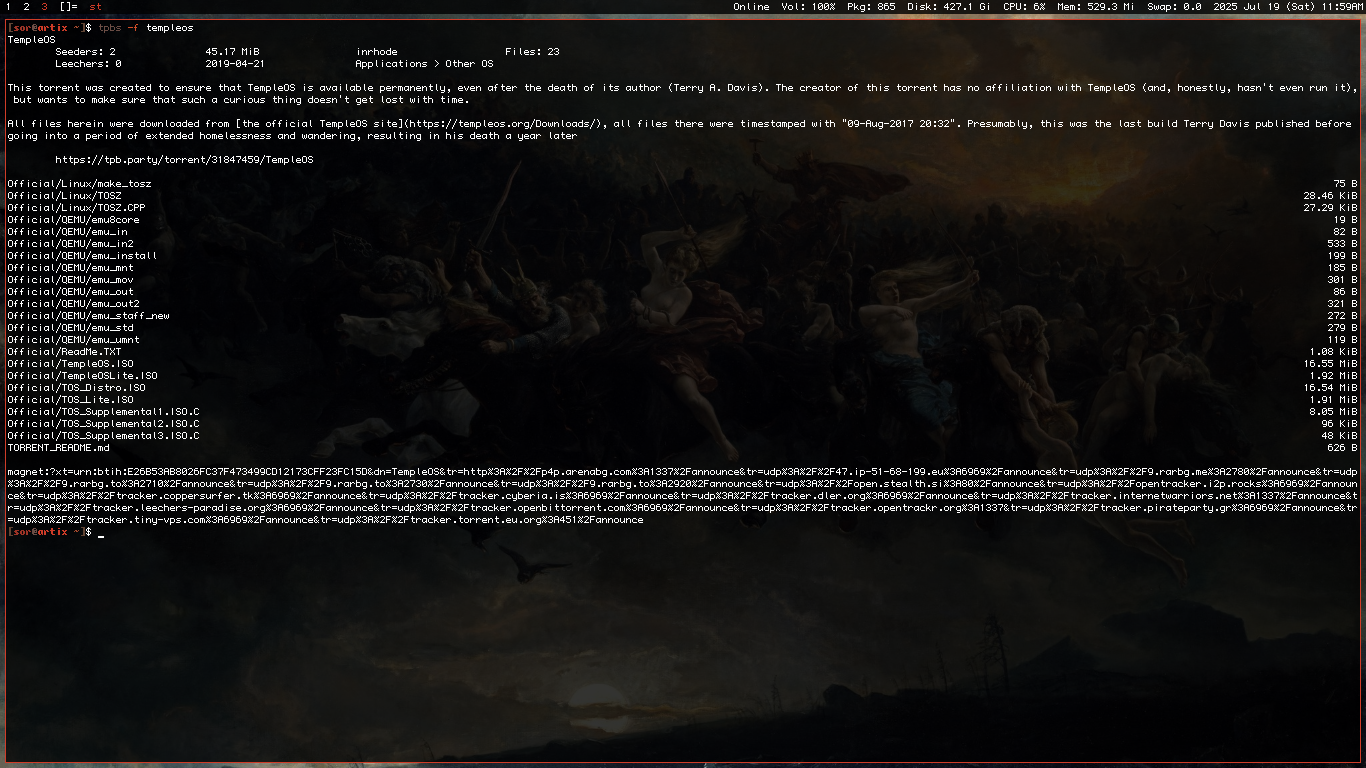
Get the page for the TempleOS torrent.
tpbs -f templeos
Select from top results from the video category, including results from page 2
Select from the 60 top results for the query "movie" in the video category.
tpbs -n 2 -v movie
TODO
- Support other sites
- Options to change order that torrent info (seeders, uploaders, etc.) appears
- Gradual results option
Patch notes
21/9/26 v1.1
- Small fixes
15/7/25 v1.0 Initial release
Install:
curl https://sor.neocities.org/projects/tpbs.txt -o /usr/local/bin/tpbs
chmod +x /usr/local/bin/tpbs
lyry
Shellscript Genius lyrics fetcher
Requires fzf (for -f)
Manual
Usage: lyry [options] <query>

Options:
None            Retrive top first result
 -f             Select from results
 -i             Retrieves song title, album, and link
 -u             Update frontend instance by looking for a healthy instance
 -n <number>    Number of pages to query, 10 results/page (e.g., -n 3 = 30 results, 3 pages)
Examples
Just the lyrics
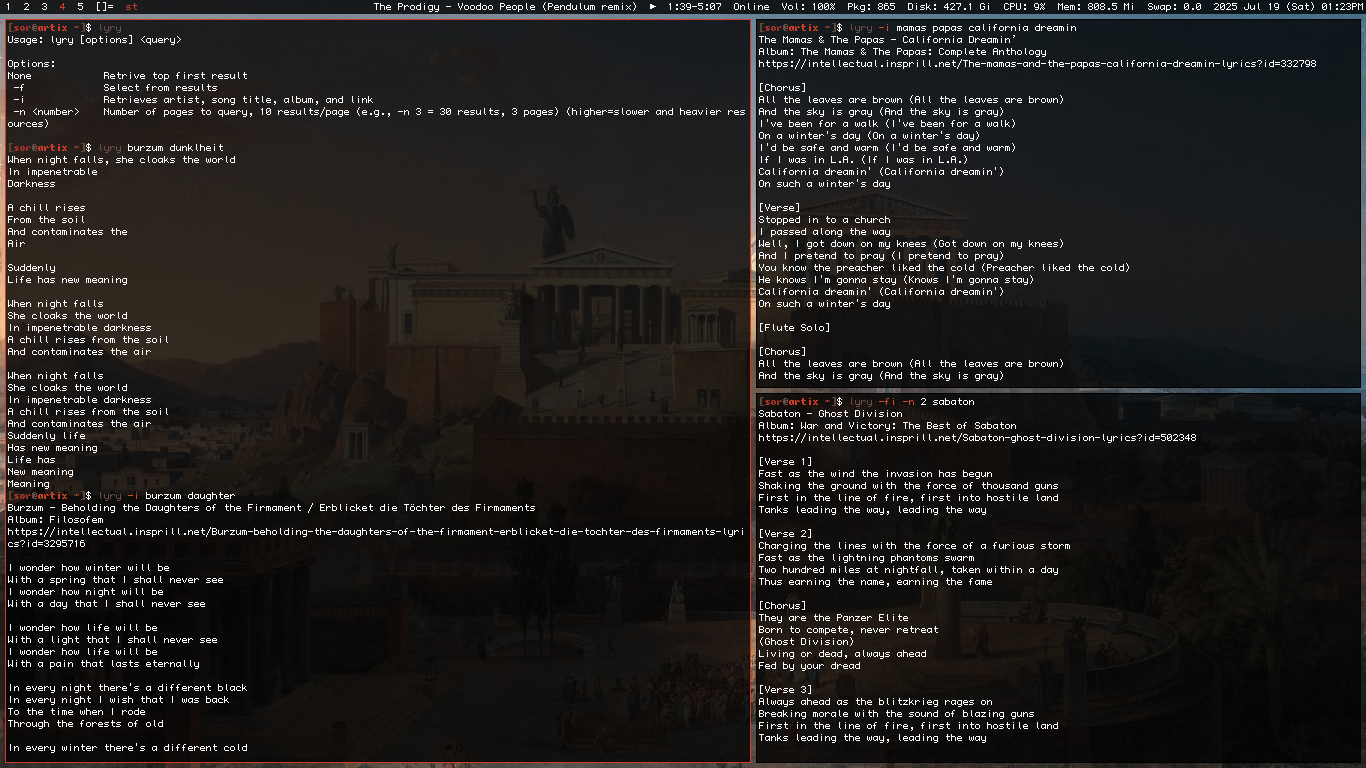
Get the lyrics for the song "Voodoo People" by The Prodigy.
lyry voodoo people
Data + lyrics
Get the lyrics of, and print information (title, artist, album (in this case a compilation the track was included), and link) about the song "The Trooper" by Iron Maiden.
lyry -i the trooper
Just lyrics, but select results
Get the lyrics of a selected song out of the results of the query "Sabaton".
lyry -f sabaton
Data, lyrics, select results, including results from page 2
Get the lyrics and info of a selected song out of the first 20 results of the query "The Cure".
lyry -fi -n 2 the cure
TODO
- Search query encoding
- Gradual results option
Patch notes
16/8/25 v1.2
- Fixed scraping on instances with newer versions of the Genius frontend
30/7/25 v1.1.2
- Fixed POSIX incompatibilities (tested on a OpenBSD 7.7 VM via QEMU)
- Minor fixes
22/7/25 v1.1.1
- Minor fixes
21/7/25 v1.1
- "-u" option to update frontend instance
15/7/25 v1.0 Initial release
Install:
curl https://sor.neocities.org/projects/lyry.txt -o /usr/local/bin/lyry
chmod +x /usr/local/bin/lyry
memer
Shellscript meme maker using imagemagick
Requires imagemagick and impact font installed
Manual
Usage: memer [options] input_image top_text bottom_text output_image

Options:
 --auto-resize  Automatically resize text to fit image width.
 --auto-break   Automatically break long lines of text to fit image width.
 -f   <size>    Font size for the text.
 -ft  <size>    Font size for top text.
 -fb  <size>    Font size for bottom text.
 -s   <size>    Stroke width for the text.
 -st  <size>    Stroke width for top text.
 -sb  <size>    Stroke width for bottom text.
 -fc  <color>   Fill color for the text.
 -fct <color>   Fill color for the top text.
 -fcb <color>   Fill color for the bottom text.
 -sc  <color>   Outline color for the text.
 -sct <color>   Outline color for top text.
 -scb <color>   Outline color for bottom t

Arguments:
 input_image    Path to input image.
 top_text       Text to be placed at the top of the image.
 bottom_text    Text to be placed at the bottom of the image.
 output_image   Path to output image. Defaults to "output.jpg" if not provided.
Examples
Normal meme
Make a meme with regular colors.
memer --auto-resize image.png "TOP TEXT" "BOTTOM TEXT"
Greentext meme
Make a meme with meme arrows on top and regular text on the bottom.
memer --auto-resize -fct green image.png ">muh top text" "BOTTOM TEXT"
TODO
- Shadows option
- Maybe colors for the shadows
Patch notes
30/12/25 v1.3
- Code revamp. -82 lines.
- Minor fixes
v1.2
- "output_image" argument for output filename
- "-ft" option for top font size
- "-fb" option for bottom font size
- "-st" option for top stroke width
- "-sb" option for bottom stroke width
- "-fct" option for top fill color
- "-fcb" option for bottom fill color
- "-sct" option for top outline color
- "-scb" option for bottom outline color
- Minor fixes
v1.1
- "--auto-resize" option to automatically resize text to fit image width
- "--auto-break" option to automatically break long lines of text to fit image width
- "-f" option for font size
- "-s" option for stroke width
- "-fc" option for fill color
- "-sc" option for outline color
- Changed prompt format
Install:
curl https://sor.neocities.org/projects/memer.txt -o /usr/local/bin/memer
chmod +x /usr/local/bin/memer
Install the font:
mkdir /usr/share/fonts/impact
curl "https://dn721900.ca.archive.org/0/items/fonts_/IMPACT.TTF" -o /usr/share/fonts/impact/impact.ttf
pacmano
Shellscript pacman package organizer/logger
Manual
Usage: pacmano <option>

Options:
 save           Saves a list of your current packages to .cache/pacmano
 return         Compare your current list to an older one and remove newly installed packages
 customreturn   Same as above but you can edit the package removal list
 list           Prints out the list of lists
Examples
Make checkpoint
Save list of packages currently installed to ~/.cache/pacmano. Just like muh vidyagaem checkpoints amirite.
pacmano save
Check available "saves"
List previously saved "checkpoints" at ~/.cache/pacmano.
pacmano list
Use checkpoint
Save current state and return to determined checkpoint.
pacmano return ~/.cache/pacmano/753
Modify and use checkpoint
Same as above, but while also editing selected checkpoint with default editor, ($EDITOR variable or xdg-open if variable is not set) allowing users to erase programs they don't want to remove from the deletion list.
pacmano customreturn ~/.cache/pacmano/825
Patch notes
v1.1
Install:
curl https://sor.neocities.org/projects/pacmano.txt -o /usr/local/bin/pacmano
chmod +x /usr/local/bin/pacmano


